This website uses cookies
This website uses cookies. For further information on how we use cookies you can read our Privacy and Cookie notice

This website uses cookies. For further information on how we use cookies you can read our Privacy and Cookie notice
/product/23/2969523/1.jpg?5065)
/product/23/2969523/2.jpg?5065)
/product/23/2969523/3.jpg?5065)
/product/23/2969523/4.jpg?5065)
/product/23/2969523/5.jpg?5065)
/product/23/2969523/6.jpg?5065)
Few units left

Express delivery in main cities
Easy Return, Quick Refund.Details
YFCT-COD
86%Seller Score
7 Followers
Shipping speed: Excellent
Quality Score: Good
Customer Rating: Average
FAQ( Frequently Asked Questions )
Q1: What should I do if I cannot access the Repeater’s web management page?
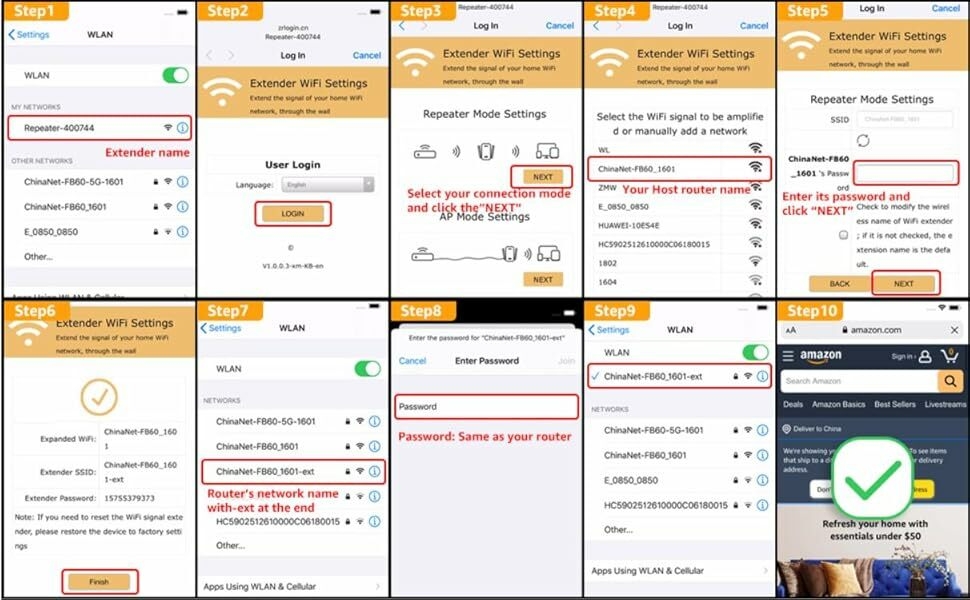
A1: Make sure your computer is connected to the extended network.
A2: Make sure your computer is set to obtain an IP address automatically.
A3: If the Repeater has connected to the router, you should go to your router’s DHCP client list to obtain the Repeater’s current IP address.
A4: Reset the Repeater.
Q2: Why does the wireless transmission rate speed down,when the wireless signal is stronger after repeated by the Repeater?
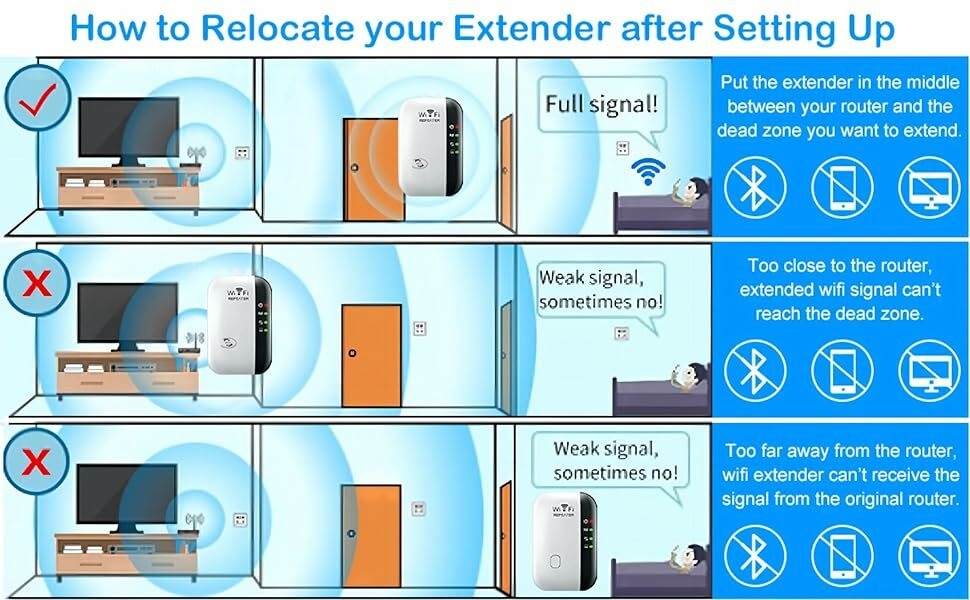
A1: In compliance with the wireless transmission protocol, all the Repeater devices are set to work in half duplex instead of full duplex mode. In other words, the Repeater has to process one-way communication between your root Wireless router(or AP) and the terminal clients; so the transmission time will be double increased, while the speed will be decreased.Recommends that you connect to the extender when your home network connection is poor, or when you want a larger wireless coverage to eliminate "dead zones”.
Q3: Why the devices connected to the Repeater cannot get an IP address from the Repeater and cannot access the Internet?
A1: Maybe you enabled a wireless MAC filter, wireless access control, or access control list(ACL) on your router. To solve this problem, please log into your router and disable theMAC filter, wireless access control or ACL.
A2: Maybe the Repeater has not been successfully connected to your router, please reset the Repeater and Reconfiguration.
A3:Maybe the IP address of the router is occupied or the wireless device connected by the router has reached the limit. please reboot your router, then reset the Repeater and Reconfiguration.
Note: If you need to connect the network cable, please connect the network cable after the configuration is completed.

This product has no ratings yet.
/product/23/2969523/1.jpg?5065)
Subscribe to our newsletter
and be the first one to know about our amazing deals